How to Use a Resource Pack on Your Minecraft Server
Make every player download your pack automatically when they join.
5 min read · Updated 2026-11-14
A server resource pack downloads automatically when players join, so everyone sees the same textures. A vanilla server accepts one pack. If you want several, mix them into one pack first.
1. Host the zip with a direct download link
The server needs a link that downloads the .zip file directly, not a web page with a download button. Test it by pasting the link into a private browser window: the download should start immediately.
- Your own website or a file host that provides direct links works best.
- Some cloud storage services only give share pages. Check their help for a direct-download option; for Dropbox, changing
dl=0todl=1at the end of the link does this.
2. Get the SHA-1 hash
The SHA-1 hash lets players' games check that they have the latest version of your pack. After you press Mix in PackMixer, open Use it on a server to copy the SHA-1 of the zip you just made.
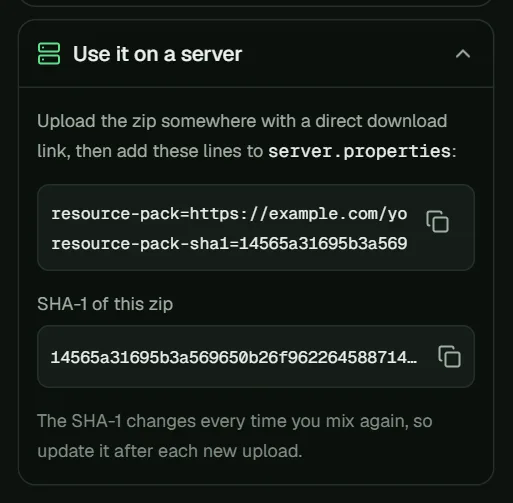
3. Edit server.properties
Stop the server, open server.properties and set:
resource-pack=https://example.com/your-pack.zip
resource-pack-sha1=YOUR_SHA1_HASH
On Minecraft 1.17 and newer you can also use:
require-resource-pack=true– players who decline the pack are disconnected.resource-pack-prompt=– a message shown when players are asked to download the pack.
Save the file and start the server again.
4. Updating the pack
Every time you change the pack, the zip and its SHA-1 change too. Upload the new zip and update resource-pack-sha1. If you forget, players keep using the cached old version.
Common problems
- The pack never downloads. The link is probably not a direct download. Test it as described above.
- "Failed to download". The file may be too large. Older versions such as 1.8.9 only accept small server packs (around 50 MB), so keep packs for older servers small.
- Players see an old version. The SHA-1 was not updated after the zip changed.
- Connected glass does not work for some players. CTM and custom skies only show for players with OptiFine or a compatible mod. See connected textures and OptiFine.